How it works
Set up your household once. Every listing does the rest.
-
Add your people and places
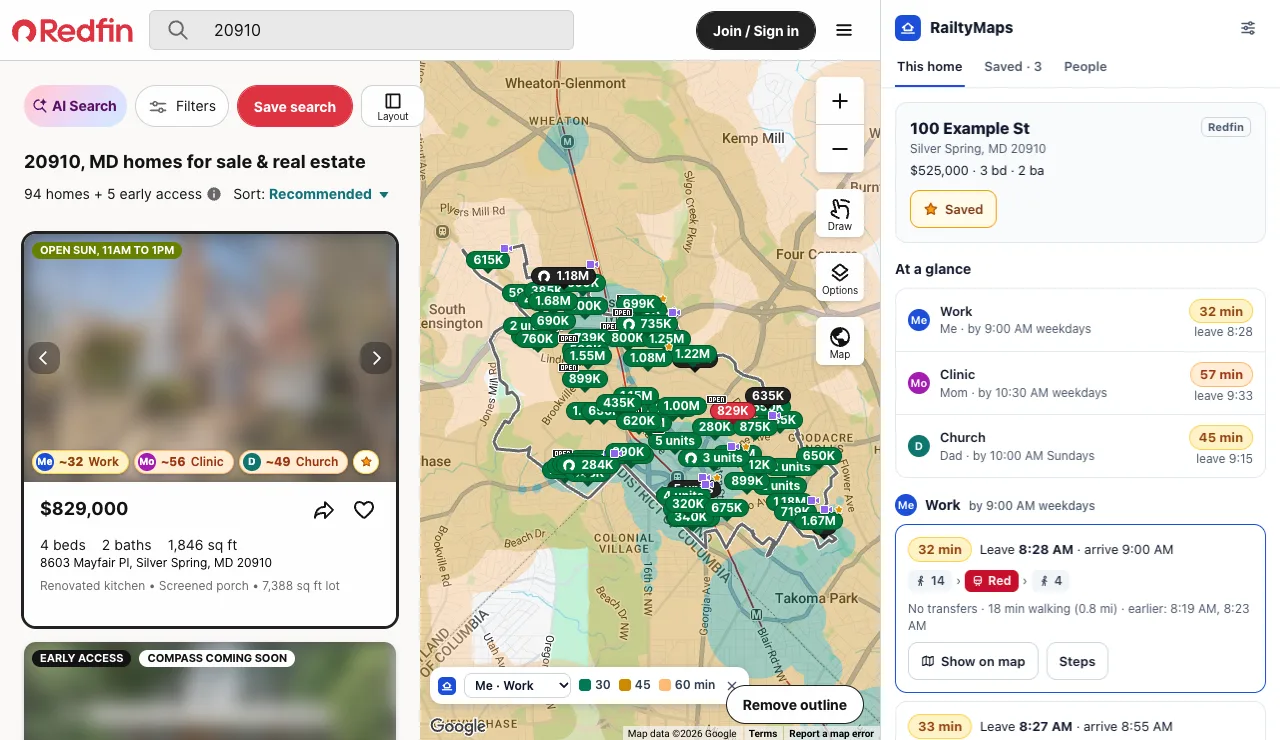
Who's moving with you, where each of them needs to be, and by when: work by 9:00 on weekdays, the clinic by 10:30, church by 10 on Sundays.
-
Search Zillow or Redfin as usual
Every home in the results gets a time for each person and place, and the map shades where you can live and still get there on time.
-
Open a home for the routes
See when to leave, every walk and ride, and the trips before and after. Save the homes you like and compare them side by side.
Everyone's trips, on every listing
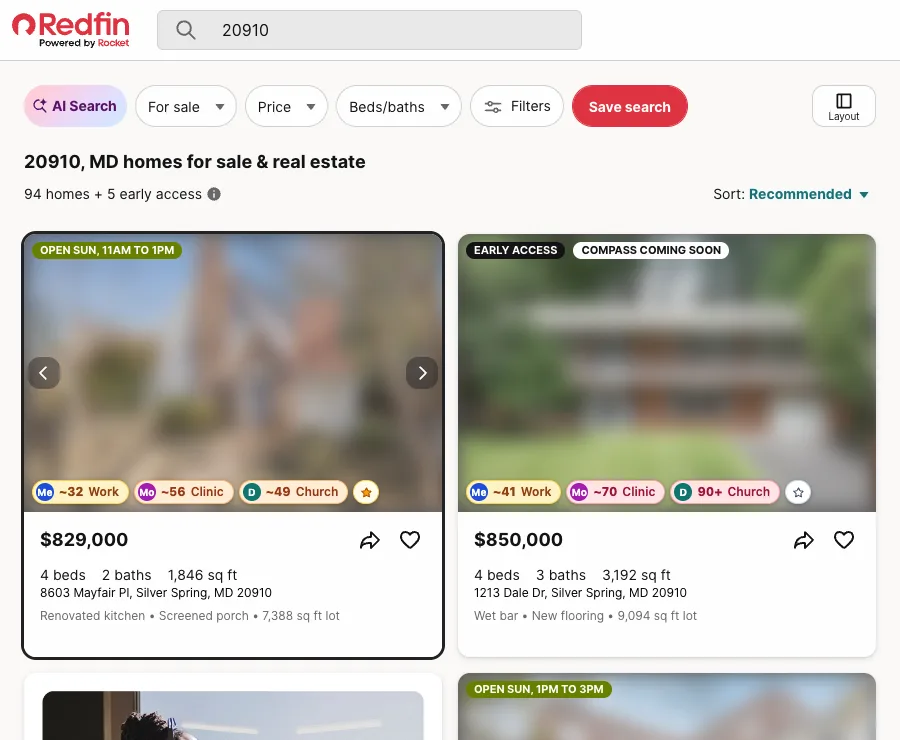
Each home gets one time per person and place, colored from green to red, so the listings that work for the whole household stand out while you scroll.
- Hover a time to see the stop and the walk
- Click it for the full routes in the side panel
- Star a home to save it without leaving the page
Every route, step by step
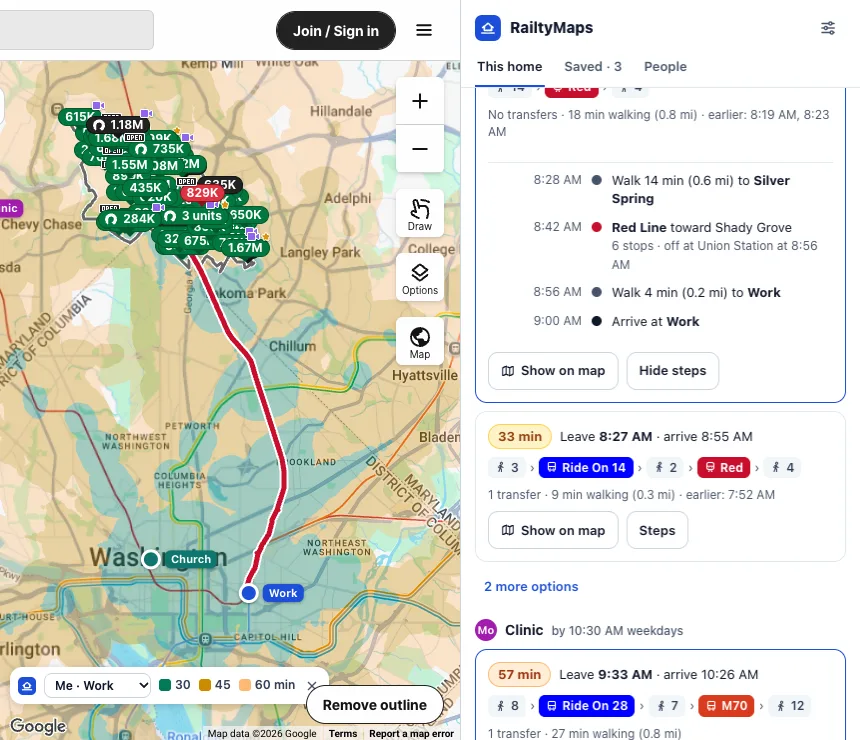
Open a home to see when to leave for each place, every walk and ride in order, and the same trip earlier or later. Show on map draws it right on the listing's map.
- Leave-by times for each deadline
- Transfers and total walking, spelled out
- Walks past someone's limit are flagged, not hidden
Compare saved homes for the whole household
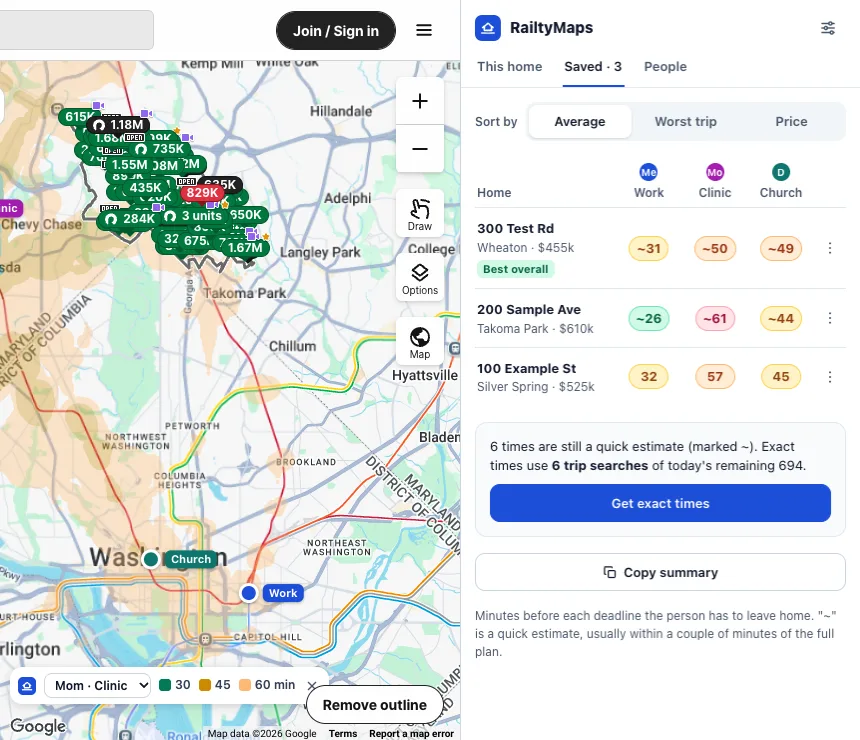
Rank the homes you saved by average or worst trip, see who each one is hard on, and copy a plain-text summary for the family group chat.
- Sort by average, worst trip or price
- Exact times for every saved home in one click
- A summary you can paste anywhere
Built around people
A ten-minute walk for one person is twenty for another
Their pace, their limit
Each person gets a walking pace and a longest walk, and every time on the page is figured for them.
Step-free when it matters
Turn on step-free for anyone who can't manage stairs, and routes use elevators and ramps where the map data has them.
Driving and walking, too
Set any place to car or on foot, so the person who drives to work shows up on the same card.
Times you can plan around
A time is how long before the deadline you leave home, waiting included. 34 for work at 9:00 means leave by 8:26.
Coverage
Works across most of the US
Trips are planned by Transitous, a free trip planner run by volunteers, using about 350 US transit feeds across 41 states and DC. Driving and walking places don't need transit schedules at all.
See which agencies are included- New York
- Los Angeles
- San Francisco Bay Area
- Chicago
- Boston
- Philadelphia
- Washington, DC
- Seattle
- Portland
- Denver
- Atlanta
- Phoenix
- Minneapolis
- Texas metros
- Florida metros
- and many smaller systems
Your household stays in your browser
People, places and saved homes are kept by Chrome on your computer. There's no account, no analytics and no RailtyMaps server.
- Trip planning sends map coordinates, and what you type into place search, to Transitous.
- Street addresses you search for can also go to the US Census geocoder.
Open source and free
RailtyMaps is MIT licensed and built in the open. Read the code, report a problem, or point it at your own MOTIS routing server.
- No ads, no upsell, nothing to sign up for.
- Built on open data published by transit agencies.
Install RailtyMaps
The Chrome Web Store listing is on its way. Until then, installing it from GitHub takes about a minute.
Download the latest releaseNeeds Chrome 116 or newer.
- Download the zip from the latest release and unzip it.
- Open
chrome://extensionsand turn on Developer mode. - Click Load unpacked and pick the unzipped folder.
- Pin RailtyMaps to the toolbar and click it to set up your household.
Questions
Is RailtyMaps free?
Yes. It's free and open source under the MIT license, with no ads, no account and no tracking.
Which sites does it work on?
Zillow and Redfin: search results, the map, and individual home pages. It runs in Google Chrome 116 or newer.
Does it work in my city?
Transit times work anywhere in the US that Transitous has schedules for, which covers most big metros and many smaller systems. Driving and walking places don't need transit schedules. If your buses and trains are missing, their schedules can be added to Transitous.
What does the number on a listing mean?
How many minutes before the deadline you'd leave home, counting walking and waiting. 34 for work at 9:00 means leave by 8:26. A ~ marks a quick estimate; open the home for the full trip plan.
Does it include live delays or traffic?
No. Transit times come from each agency's published schedule for an ordinary weekday or weekend, and driving times are without traffic.
What does RailtyMaps send, and to whom?
Map coordinates of your places and of homes you look at go to Transitous to plan trips, along with what you type into place search. Addresses you search for can also go to the US Census geocoder. Your people, places and saved homes stay in your browser. The privacy policy has the details.
Is it made by Zillow or Redfin?
No. RailtyMaps is an independent open-source project, not affiliated with Zillow, Redfin or any transit agency.
Can I use it in Firefox or Safari?
Not yet. RailtyMaps is a Chrome extension for now.